

When your application calls an HTTPS endpoint like:
https://api.domain.net
your browser or backend service doesn’t just trust it automatically. It verifies a certificate chain to ensure the server is legitimate and not part of a man-in-the-middle attack.
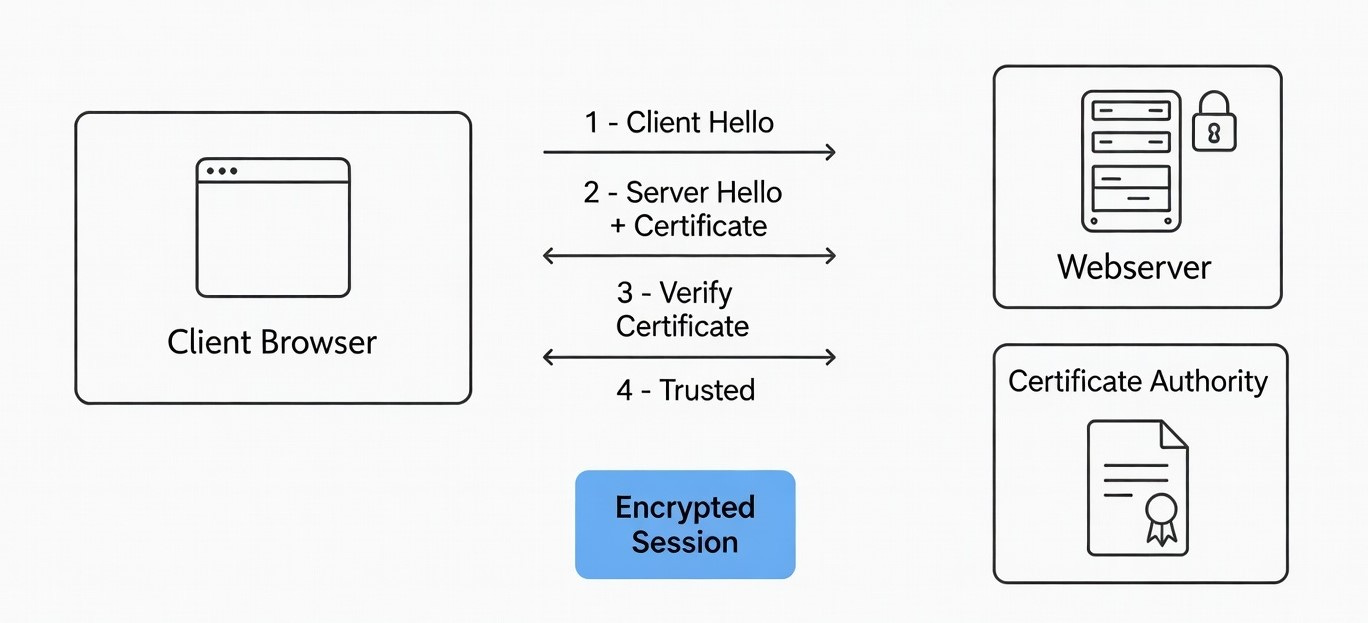
💡Whenever in doubt, This single command solves most TLS mysteries: openssl s_client -connect yourdomain.com:443 -showcerts
If you’ve ever seen errors like:
PKIX path building failed
SSLHandshakeException
certificate chain incomplete
unable to get local issuer certificate
this article is for you.
What Is a Certificate Chain?
A certificate chain (also called a chain of trust) is a sequence of certificates that links:
Your Website Certificate
        ↓
Intermediate Certificate
        ↓
Root Certificate (Trusted by OS/Browser/JVM)
Let’s break it down.
1️⃣ Leaf Certificate (Server Certificate)
This is the certificate issued to your website.
Example:
CN=api.domain.netIt proves:
The domain identity
The public key of the server
The validity period
But this certificate is not trusted by itself.
2️⃣ Intermediate Certificate
Issued by a Certificate Authority (CA) like:
DigiCert
GeoTrust
GlobalSign
Let’s Encrypt
The intermediate signs your server certificate.
Why not sign directly with the root?
Because root keys are highly protected and rarely used.
3️⃣ Root Certificate
Example:
CN=DigiCert Global Root CA
This certificate:
Is self-signed
Is already installed in:
Windows
macOS
Linux
Browsers
Java truststore (cacerts)
If your chain successfully links to a trusted root → connection is secure.
How the Trust Verification Works
When a client connects:
Server sends:
Leaf certificate
Intermediate certificate(s)
Client verifies:
Domain matches
Signature chain is valid
Root exists in trust store
If any link is missing → TLS handshake fails.
Why Browsers Work but Java Fails
Browsers:
Automatically download missing intermediate certificates.
Java (Spring Boot, RestTemplate, WebClient):
Does NOT auto-download intermediates.
Requires full chain during handshake.
That’s why backend services often fail even when the browser works.
Inspecting Certificate Chains Using Git Bash + OpenSSL
Git for Windows includes OpenSSL inside Git Bash.
Step 1: Open Git Bash
Step 2: Run This Command
openssl s_client -connect api.domain.net:443 -showcerts
What This Does
Connects to port 443 (HTTPS)
Performs TLS handshake
Displays all certificates sent by the server
Example Output (Healthy Chain)
Certificate chain
 0 s:CN=api.domain.net
   i:CN=GeoTrust Global TLS RSA4096 SHA256 2022 CA1
-----BEGIN CERTIFICATE-----
...
-----END CERTIFICATE-----

 1 s:CN=GeoTrust Global TLS RSA4096 SHA256 2022 CA1
   i:CN=DigiCert Global Root CA
-----BEGIN CERTIFICATE-----
...
-----END CERTIFICATE-----
Interpretation
LevelMeaning0Your website certificate1Intermediate certificateRootAlready trusted by system
This is correct configuration.
Example Output (Broken Chain)
Certificate chain
 0 s:CN=api.domain.net
   i:CN=GeoTrust Global TLS RSA4096 SHA256 2022 CA1
-----BEGIN CERTIFICATE-----
...
-----END CERTIFICATE-----
Only certificate 0 is present.
This means:
Intermediate certificate is missing
Java clients will fail
Error:
PKIX path building failed
Extract and Analyze a Specific Certificate
You can inspect a certificate in readable format:
openssl s_client -connect api.domain.net:443 -showcerts </dev/null \
| openssl x509 -noout -text
This shows:
Validity dates
Public key length
Signature algorithm
Subject Alternative Names (SAN)
Key Usage
Check Expiration Quickly
openssl s_client -connect api.domain.net:443 </dev/null \
| openssl x509 -noout -dates
Output example:
notBefore=Aug 23 00:00:00 2025 GMT
notAfter=Feb 23 23:59:59 2026 GMT
Common TLS Errors and What They Mean
ErrorRoot CausePKIX path building failedMissing intermediate certificateunable to get local issuer certificateChain incompletecertificate expiredLeaf or intermediate expiredhostname verification failedCN/SAN mismatch
Best Practice for Servers
Always configure your server with:
Full Chain Certificate = Leaf + Intermediate(s)Not just the leaf certificate alone.
If using:
Azure App Service → upload full-chain PFX
Nginx → use
fullchain.pemApache → use
SSLCertificateChainFileDocker → ensure bundled cert includes intermediates
Visual Representation
Client (Browser / Java)
        ↓
[ Leaf Certificate ]
        ↓
[ Intermediate CA ]
        ↓
[ Root CA (Trusted Store) ]
If any link is missing → connection rejected.
Final Thoughts
Understanding certificate chains is essential for:
Backend engineers
DevOps teams
Cloud architects
API developers
It helps diagnose:
Spring Boot SSL errors
Azure deployment issues
Load balancer TLS problems
Reverse proxy misconfigurations
Whenever in doubt:
openssl s_client -connect yourdomain.com:443 -showcertsThis single command solves most TLS mysteries.
Explain the following openssl command
Command: openssl s_client -connect api.domain.net:443 -showcerts
Output, here explain the output:
The three links
Depth 0 — Leaf certificate (the actual website’s identity)
s: CN=api.domain.neti: C=US, O=DigiCert Inc, ... CN=GeoTrust TLS RSA CA G1NotBefore: Jun 20 2026 → NotAfter: Dec 20 2026 (6 months)
s:= subject — who this certificate identifies. This is your server,api.domain.net.i:= issuer — who signed/vouches for this cert. Here it’sGeoTrust TLS RSA CA G1.This is the cert that’s short-lived and gets swapped out every renewal cycle — it’s the one your Spring Boot client is (wrongly) pinned to.
Depth 1 — Intermediate certificate (the middleman CA)
s: CN=GeoTrust TLS RSA CA G1 ← same as the leaf's issuer abovei: CN=DigiCert Global Root G2NotBefore: 2017 → NotAfter: 2027 (10 years)
Notice the subject of this cert matches the issuer of the leaf — that’s literally how chain-building works: each cert’s subject is the next cert’s issuer, forming a chain upward.
This intermediate exists so DigiCert doesn’t have to sign every website cert directly with its precious root key. It’s DigiCert’s “operational” signing CA — long-lived (10 years) and does not change when your leaf cert rotates every 6 months. That’s why it’s stable across Azure’s renewals.
Depth 2 — Root certificate (the ultimate trust anchor)
CN=DigiCert Global Root G2
This is a self-signed certificate (its own subject and issuer are the same, though it’s truncated in your output). It’s pre-installed in every OS/browser/JVM’s trust store.
Nobody “issues” the root — you either trust it by default (it’s baked into
cacertsin Java, or your OS keychain) or you don’t.
How verification actually works
Root (trusted by JVM by default) ↑ signsIntermediate (GeoTrust TLS RSA CA G1) ↑ signsLeaf (api.domain.net) ← this is what the server presents
A client walks this chain upward: “Is the leaf signed by that intermediate? Is that intermediate signed by a root I already trust?” If yes all the way up, Verify return code: 0 (ok) — exactly what you see at the bottom of your output.
A correctly configured client trusts the root (or validates the whole chain up to it) and doesn’t care that the leaf changes every 6 months — new leaf, same issuer, same root, chain still validates fine.
Where the root actually shows up
At the very top of your output, in the verification path messages (before the Certificate chain section):
depth=2 C=US, O=DigiCert Inc, OU=www.digicert.com, CN=DigiCert Global Root G2
verify return:1
depth=1 C=US, O=DigiCert Inc, OU=www.digicert.com, CN=GeoTrust TLS RSA CA G1
verify return:1
depth=0 CN=api.domain.net
verify return:1
That depth=2 line is the only place the root is mentioned. OpenSSL is telling you: “I built a 3-link chain to verify this — leaf(0) → intermediate(1) → root(2) — and each link checked out (verify return:1).”
Why it’s not in the “Certificate chain” block below
The Certificate chain section (the one with 0 s:... / 1 s:... and the actual -----BEGIN CERTIFICATE----- PEM blocks) only contains what the server itself sent over the wire during the TLS handshake. Your server sent exactly 2 certificates:
0 = leaf (api.domain.net)
1 = intermediate (GeoTrust TLS RSA CA G1)
This is correct, standard, expected server behavior. Servers are not supposed to send the root certificate — clients (browsers, JVMs, OS trust stores) already have well-known roots like DigiCert Global Root G2 pre-installed locally. Sending it would just be wasted bytes on every single handshake.
Video Demo
Hi, I’m Wajid Khan. I am trying to explain computer stuff in a simple and engaging manner, so that even non-techies can easily understand, delivered to your inbox weekly.
Thanks for reading Wajid Khan! Subscribe for free to receive new posts and support my work.
🏴The Following Section Help Spring Boot Team to Automate the Certificate Trust Process On the Oracle Cloud
NOTE: OCI-Side Automation
You can automate the trust process on the Oracle Cloud side:
OCI Certificates Service: You can use the OCI Certificates service to store the public portion of the certificate.Startup Script: Add a small script to your Spring Boot deployment on OCI that downloads the public certificate from your API’s URL and imports it into the Java truststore (keytool -import) every time the application starts.
To automate the import of the certificate into your Spring Boot environment on OCI, use a script that pulls the current certificate chain directly from your api endpoint and injects it into the Java Truststore.
The Automation Script
This script uses openssl to fetch the certificate from your API URL and keytool to import it into the JVM’s cacerts. Oracle Documentation recommends importing root, intermediate, and server certificates for full chain trust.
bash
#!/bin/bash

# Configuration
API_URL="api.domain.net"
PORT=443
ALIAS="cloud-api-managed-cert"
STOREPASS="changeit" # Default Java truststore password
CACERTS_PATH="$JAVA_HOME/lib/security/cacerts"

echo "Fetching certificate from $API_URL..."

# 1. Download the certificate chain
openssl s_client -showcerts -connect ${API_URL}:${PORT} </dev/null 2>/dev/null | \
openssl x509 -outform PEM > cloud_cert.pem

if [ ! -s cloud_cert.pem ]; then
    echo "Error: Could not retrieve certificate."
    exit 1
fi

# 2. Remove old version of the certificate if it exists
keytool -delete -alias "$ALIAS" -keystore "$CACERTS_PATH" -storepass "$STOREPASS" 2>/dev/null

# 3. Import the new certificate chain
# -noprompt ensures it doesn't wait for user 'yes' confirmation
keytool -import -trustcacerts -alias "$ALIAS" -file cloud_cert.pem \
    -keystore "$CACERTS_PATH" -storepass "$STOREPASS" -noprompt

echo "Certificate imported successfully into $CACERTS_PATH"

# 4. Cleanup
rm cloud_cert.pem
Use code with caution.
Implementation Steps on OCI
Environment Setup: Ensure the JAVA_HOME environment variable is set on your OCI instance. Use the IBM Guide to verify your cacerts location.Scheduling: To handle 90-day renewals, schedule this script to run every 60 days using a Crontab:0 0 1 */2 * /path/to/script.sh (Runs on the 1st of every second month).
Permissions: The script requires write access to the Java lib/security/ folder. Run it with sudo if necessary.

